


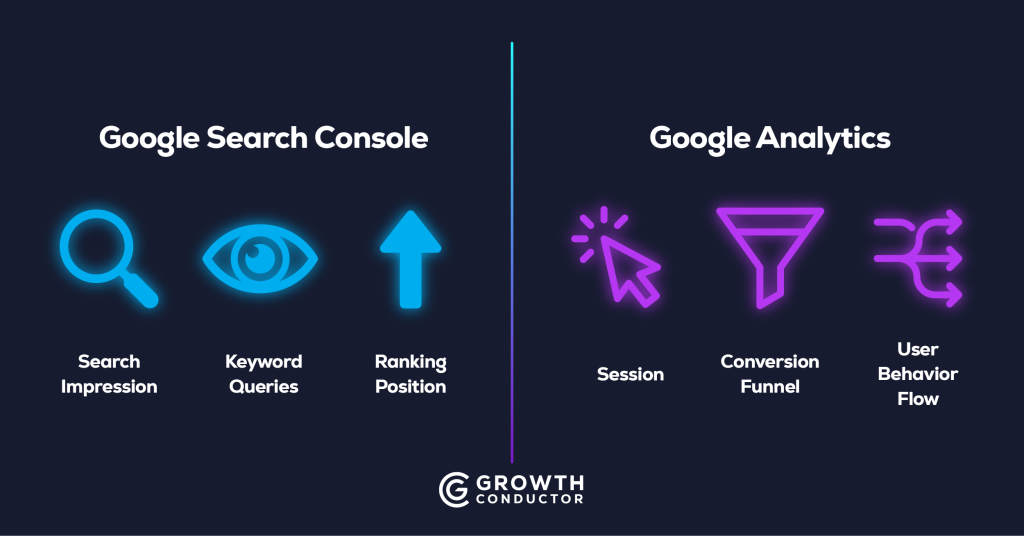
Quick Summary: Google Analytics tells you what people do on your site. Google Search Console tells you how people find your site in Google. They are complementary, not interchangeable — and most marketing teams misuse both by treating them as duplicates of the same dashboard. This guide breaks down what each tool actually measures, where their data overlaps, why their numbers never match exactly, and how to use them together to answer the SEO questions that actually matter.
What Is the Difference Between Google Analytics and Google Search Console?
Google Analytics and Google Search Console are both free tools from Google, but they answer fundamentally different questions. Google Search Console measures your site’s visibility in Google search results — what queries trigger your pages, how often they appear, and where they rank. Google Analytics measures what happens after someone arrives on your site — which pages they visit, how long they stay, and whether they convert. Understanding this distinction is the foundation for using either tool well.
The simplest way to think about it: Search Console owns everything before the click. Analytics owns everything after it.
What Google Analytics Measures
Google Analytics 4 — the current version — tracks on-site user behavior through an event-based tracking model. Its core metrics include sessions, engaged sessions, users, and events. It shows you where traffic comes from (organic search, paid ads, social, email, direct), what users do on your site (pages viewed, scroll depth, button clicks), and whether they complete the actions that matter to your business (form submissions, purchases, phone calls).
GA4 is event-based, meaning every user interaction is logged as an event rather than a pageview. This makes it more flexible than older versions but also more complex to configure. Without custom event setup, most businesses are only seeing a fraction of what GA4 can report.
What Google Search Console Measures
Search Console focuses entirely on your site’s relationship with Google search. Its Performance Report shows four key metrics: impressions (how often your pages appeared in search results), clicks (how often someone clicked through to your site), click-through rate (clicks divided by impressions), and average position (where your pages ranked for a given query).
Beyond performance data, Search Console also reports on index coverage — which of your pages Google has indexed and which it hasn’t (and why). It surfaces Core Web Vitals scores, mobile usability issues, structured data errors, and manual actions. None of this data exists anywhere in Google Analytics.
Do I Need Both Google Analytics and Search Console?
Yes. Any website with organic search as a meaningful traffic source needs both tools running simultaneously. Search Console tells you whether your SEO strategy is generating visibility. Google Analytics tells you whether that visibility is translating into business outcomes. Without both, you are making decisions with half the data.
Consider this scenario: a business notices organic traffic has been flat for three months despite publishing new content weekly. Google Analytics confirms sessions are stagnant — but that’s the end of the story in GA4. Search Console, however, reveals that impressions have actually increased 40% over the same period, but average position has dropped from 8.2 to 14.6. The content is being seen more, but ranking lower — which means the problem is competitive displacement, not content volume. That diagnosis is impossible without both tools.
When You’d Lean on Search Console
Search Console is your first stop when diagnosing anything related to search visibility. Use it when rankings drop and you need to identify which queries or pages lost position. Use it when new content isn’t appearing in search results and you need to check whether Google has indexed the page at all. Use it to identify keyword opportunities — queries where you’re earning impressions but not clicks, which signals a title or meta description problem. And use it to catch Core Web Vitals or mobile usability issues before they erode your rankings. These are exactly the diagnostic workflows that Growth Conductor’s SEO services are built around — connecting visibility signals to strategic action.
When You’d Lean on Google Analytics
Google Analytics is your tool for everything that happens on-site. Use it to measure conversions and revenue from organic traffic. Use it to understand user behavior — which pages hold attention, where visitors drop off, and which content drives the deepest engagement. Use it to build audience segments for retargeting campaigns. And critically, use it to compare organic search performance against your other channels — paid, social, email, direct — in a single view. That cross-channel comparison only exists inside GA4.
“Search Console tells you what got someone to your site. Analytics tells you what happened next.”
What Data Does Search Console Show That Google Analytics Doesn’t?
Search Console is the only free tool that provides keyword-level search data for your website. Google removed keyword referrer data from Analytics in 2011, which is why GA4 shows the infamous “(not provided)” for organic search terms. If you want to know exactly which queries drive impressions and clicks to your pages, Search Console is your only source.
Search Queries and Impressions
The Performance Report in Search Console is arguably the most valuable free SEO dataset available. It shows every query that triggered your site in Google search, along with how many impressions it earned, how many clicks it received, its CTR, and its average position. This data lets you identify content gaps (queries where you’re earning zero impressions), optimization targets (queries ranking on page two), and CTR problems (queries with high impressions but low clicks, signaling weak title tags or meta descriptions).
Indexing and Crawl Data
Search Console’s Pages report shows which URLs Google has indexed and which it has excluded — along with specific reasons like “Crawled — currently not indexed,” “Duplicate without user-selected canonical,” or “Blocked by robots.txt.” This indexing data is completely invisible in Google Analytics. You can also submit sitemaps, request indexing for new pages, and use the URL Inspection tool to see exactly how Google renders a specific page.
Search Appearance and Enhancements
Search Console reports on structured data validation, rich result eligibility, and — as of 2026 — AI Overview appearance. When your URL is cited in a Google AI Overview, Search Console logs the impression. This is increasingly important as AI Overviews appear in over half of all searches. Understanding which of your pages earn AI Overview citations starts in Search Console, not Analytics — and it starts with producing the kind of non-commodity content that AI search rewards.
What Data Does Google Analytics Show That Search Console Doesn’t?
Google Analytics owns the on-site half of the picture. Everything that happens between a user arriving on your site and leaving — their behavior, their conversions, their revenue — lives in GA4. Search Console has no visibility into any of it.
On-Site User Behavior
GA4 tracks engaged sessions (sessions lasting longer than 10 seconds, with a conversion event, or with two or more page views), scroll depth, click events, video plays, file downloads, and virtually any other interaction you configure. This behavioral data tells you whether your content is actually useful after someone arrives — a question Search Console can’t answer.
Conversions and Revenue Attribution
GA4’s event-based model lets you define any user action as a conversion — form submissions, purchases, phone calls, demo requests. It then attributes those conversions across traffic sources, giving you a clear view of organic search’s contribution to revenue. Multi-channel attribution modeling in GA4 shows how organic search interacts with paid, social, and email touchpoints along the conversion path.
Cross-Channel Comparison
One of GA4’s most underused features is its ability to compare channel performance side by side. You can see how organic search stacks up against paid search, social media, email campaigns, and direct traffic — all measured by the same methodology. This is the only place where you can answer the question “Is our SEO investment performing better than our paid spend?” with apples-to-apples data. For businesses that need this kind of cross-channel clarity, building a structured marketing analytics and reporting layer on top of GA4 turns raw channel data into decision-ready insight.
AI Assistant Traffic as a Default Channel
As of May 2026, GA4 now includes a dedicated “AI Assistants” default channel group that automatically separates traffic from recognized AI chatbots — including ChatGPT, Gemini, and Perplexity — from general referral traffic. Previously, visits from AI platforms were lumped into the referral channel, making them invisible as a distinct acquisition source. Google’s announcement of the AI assistant channel group means GA4 can now answer a question Search Console cannot: how much of your traffic comes from AI platforms rather than traditional search?
This matters for two reasons. First, AI-driven referral traffic behaves differently from organic search traffic — users arriving from a ChatGPT citation are often further along in their research and convert at different rates. Second, if your content strategy includes optimizing for AI citation (which it should), GA4’s new channel group gives you the first native reporting layer to measure whether that strategy is working. Search Console shows whether your pages appear in Google’s AI Overviews. GA4 now shows whether AI platforms outside of Google are also sending you qualified traffic.
Why Don’t Google Analytics and Search Console Numbers Match?
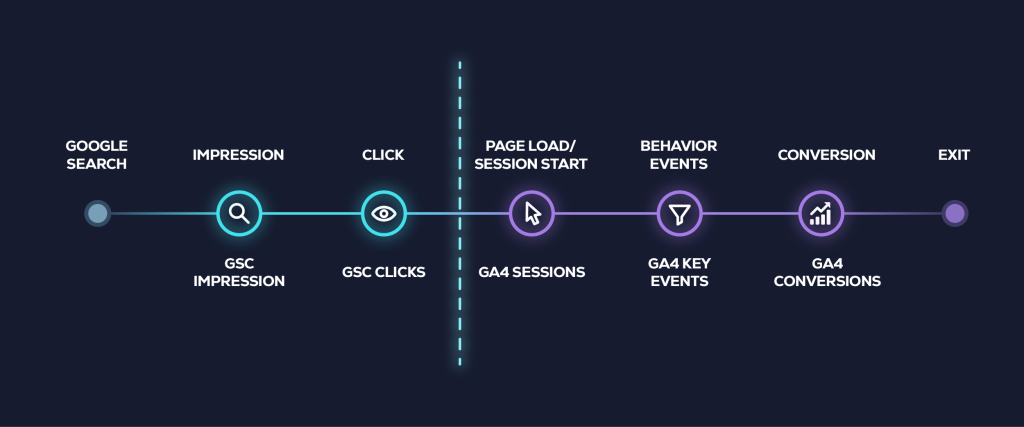
This is one of the most common questions in SEO, and the answer is simple: the two tools measure different things at different points in the user journey. They will never produce identical numbers, and they are not designed to.
Search Console counts clicks — the moment a user taps a result in Google. Google Analytics counts sessions — the moment your tracking script fires on the destination page. Between those two events, several things can break the 1:1 relationship. The user might click but hit the back button before the page loads. An ad blocker might prevent the GA4 tag from firing. A redirect chain might add latency or drop the referrer. The user might click the same result twice in one session, registering one session but two clicks.
There are also structural differences. Search Console uses Pacific Time by default; GA4 uses the time zone you configured during setup. Search Console reports on the full calendar day; GA4 sessions can span midnight. And each tool filters bot traffic using different methodologies.
The takeaway: look for directional alignment, not exact matches. If both tools show organic traffic trending up 20–25% over a quarter, you’re in good shape. If one shows a 30% increase and the other shows a 10% decline, something is broken and needs investigation.
“Stop trying to make GA4 and GSC numbers match. They never will — and they’re not supposed to.”
How Do You Connect Google Analytics 4 to Search Console?
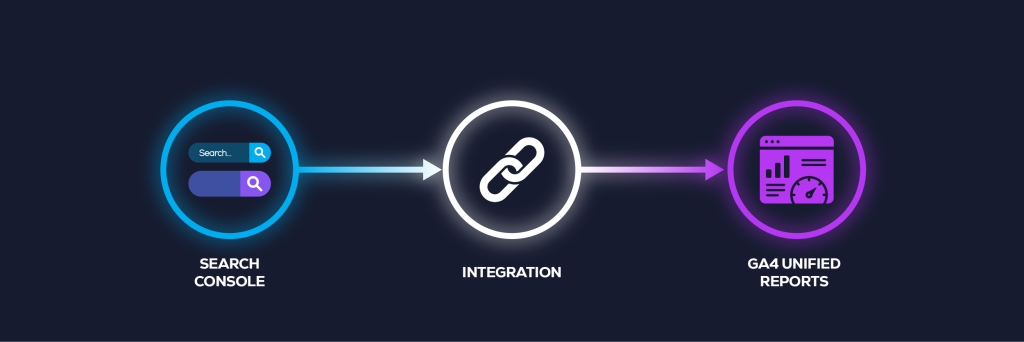
Linking your GA4 property to your Search Console property unlocks combined reporting inside Google Analytics — letting you see search query data alongside on-site behavior in a single interface. Google announced the GA4-to-Search Console integration to give marketers a unified view of acquisition and engagement data. The process takes about two minutes and requires admin access to both tools under the same Google account.
Step-by-Step Linking Process
- Confirm you have admin or editor access to both your GA4 property and your Search Console property under the same Google account.
- In GA4, open the Admin panel (gear icon in the lower left).
- Under Product Links, select Search Console Links.
- Click Link, then choose the Search Console property you want to connect.
- Select the GA4 web data stream to associate with the Search Console property, then confirm.
What You Unlock by Linking
Once linked, two new reports appear in GA4 under Acquisition: the Queries report (showing Search Console query data alongside GA4 engagement metrics) and the Google Organic Search Traffic report (showing landing page performance with both search and behavior data combined). This means you can finally answer questions like “Which search queries drive the most engaged sessions?” and “Which landing pages convert best from organic search?” — all without switching between tools.
How to Actually Use Both Tools Together for SEO
Most articles comparing these two tools stop at “use both.” That’s accurate but not useful. The real value comes from building specific workflows that combine data from both sources to answer questions neither tool can answer alone. This is the kind of cross-tool analysis that separates dashboard-watching from actual SEO strategy.
Diagnosing a Traffic Drop
When organic traffic declines, start in Search Console. Check whether impressions dropped (meaning Google is showing your pages less), whether average position dropped (meaning you’re ranking lower), or whether clicks dropped while impressions stayed flat (meaning your CTR declined). Then cross-reference in GA4: did organic sessions drop by the same percentage? If Search Console shows a decline but GA4 doesn’t, the issue is likely ranking-related. If GA4 shows a decline but Search Console doesn’t, the issue is likely on-site — a broken tracking tag, a UX change that increased bounce rate, or a redirect problem.
Finding Content Optimization Opportunities
Pull the Queries report from Search Console and filter for pages ranking in positions 11–20 — the top of page two. These pages are close to page one but not there yet. Now cross-reference in GA4: which of those pages already show strong engagement metrics (high engaged session rate, low bounce rate, conversions) when they do get traffic? Those are your highest-leverage optimization candidates. They already convert when traffic arrives — they just need the ranking boost to get more of it. This is where investing in the right E-E-A-T signals that build ranking authority pays the highest return — strengthening content depth, adding original insights, and improving credibility signals on pages that are already close to breaking through.
Measuring SEO ROI
Search Console shows visibility — impressions, clicks, position. Google Analytics shows revenue — conversions, transaction value, goal completions. SEO ROI lives at the intersection. The workflow is straightforward: track keyword position improvements in Search Console, then tie the corresponding traffic and revenue changes in GA4 to those same pages. When you can show that moving a page from position 12 to position 5 generated an additional $14,000 in monthly revenue, you’ve connected search visibility to business outcomes in a way that justifies continued SEO investment.
This is the kind of reporting layer that turns raw data into decisions. At Growth Conductor, building data-powered SEO strategies means connecting these two data streams into a single view that ties keyword movements to revenue — not just rankings on a spreadsheet.
Common Mistakes Marketers Make With GA4 and Search Console
Even experienced marketers misuse these tools. Here are five of the most common setup and interpretation mistakes that cost teams real insight:
5 Setup Mistakes Costing You SEO Insight
- Treating GSC clicks as a substitute for GA4 sessions. They measure different events. One click can generate multiple sessions, and one session can be missed entirely if tracking is blocked. Use each metric for what it’s designed to report.
- Reporting GSC average position without context. Average position is an aggregate across all queries a page ranks for — including long-tail terms at position 80. A page with an “average position” of 15 might actually rank #3 for its primary keyword. Always filter by specific queries before drawing conclusions.
- Ignoring index coverage until traffic drops. The Pages report in Search Console often shows indexing problems weeks before they impact traffic. Reviewing it monthly catches issues like pages falling out of the index, crawl errors, and canonical conflicts before they compound.
- Not linking GA4 and Search Console. A surprising number of teams run both tools but never link them. This means they’re switching between tabs and mentally connecting data points that could be viewed in a single report. The linking process takes two minutes.
- Relying on GA4 default reports without custom events. Out-of-the-box GA4 tracks pageviews and a few automatic events, but most meaningful conversions — form submissions, phone clicks, demo requests — require custom event configuration. Without them, GA4 dramatically understates the value of organic traffic.
Frequently Asked Questions
No. They measure fundamentally different things. Search Console tracks how your site appears in Google search results — impressions, clicks, position, and indexing status. Google Analytics tracks what users do after they arrive on your site — behavior, engagement, and conversions. Without both, you are only seeing half the picture.
Yes. Both GA4 and Google Search Console are completely free. Google offers GA4 360, a paid enterprise tier with higher data limits, unsampled reporting, and SLA guarantees, but the standard version is more than sufficient for most small and mid-size businesses.
This typically happens when the GA4 tracking code is missing from the destination page, blocked by an ad blocker, or when the user clicks a result but leaves before the page fully loads and fires the analytics tag. Redirect chains, caching issues, and bot clicks can also cause this discrepancy.
Search Console data typically has a one-to-three-day processing delay. Performance data is not real-time — Google validates and aggregates it before surfacing it in reports. When diagnosing a recent change, account for this delay before drawing conclusions.
As of 2026, yes. Google Search Console reports impressions when your URL is cited in an AI Overview. However, Google’s reporting transparency around AI Overview clicks and attribution is still evolving. Treat this data as directional and monitor Google’s documentation for updates on how AI Overview interactions are measured.
Yes. As of May 2026, GA4 includes a dedicated “AI Assistants” default channel group that automatically categorizes traffic from recognized AI chatbots like ChatGPT, Gemini, and Perplexity. This separates AI-driven visits from general referral traffic, giving you visibility into how much of your audience arrives via AI platforms.
Key Takeaways
- Google Analytics measures what users do on your site. Google Search Console measures how users find your site in Google.
- You need both — they answer different questions at different points in the user journey.
- The numbers between the two tools will never match exactly, and they are not designed to.
- Linking GA4 and Search Console takes two minutes and unlocks combined reporting inside GA4.
- GA4 now tracks AI assistant traffic as its own channel — a data point Search Console doesn’t provide.
- The real value is in combined diagnostic workflows, not staring at each dashboard in isolation.
- SEO ROI lives at the intersection of visibility (Search Console) and revenue (Google Analytics).
What Comes Next
Google Analytics and Search Console give you the raw data. But data without interpretation is just noise. The businesses that win at SEO are the ones that build marketing analytics and reporting systems that connect search visibility to revenue — and act on what the numbers reveal. If your team is spending more time toggling between dashboards than making decisions from them, it might be time to talk about how a more structured analytics approach could change that.