


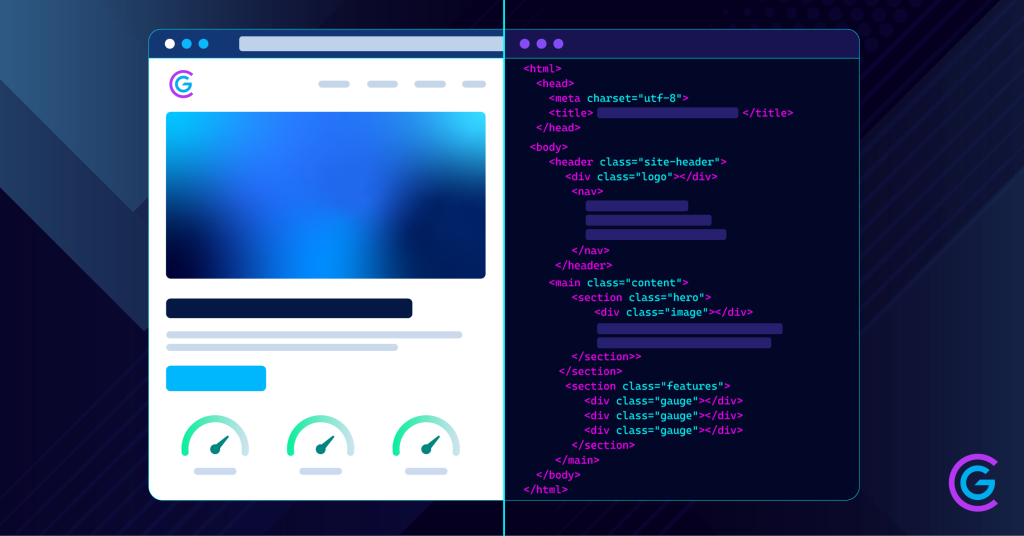
A page can pass all three Core Web Vitals, rank on the first page of Google, and still never appear as a citation in ChatGPT, Claude, or Perplexity. Not once.
That is not an authority problem and it is not a content quality problem. It is a mechanism problem, and most published advice about Core Web Vitals and AI search gets the mechanism wrong.
Here is the short version. The crawlers feeding the major AI answer engines do not execute JavaScript, do not render your page, and collect no performance data whatsoever. They cannot measure your Largest Contentful Paint. Core Web Vitals still matter for AI search visibility, but through three specific pathways rather than through direct measurement, and knowing which pathway you are working on changes what you fix first.
By the end of this article you will be able to audit any template on your site along two independent lanes and know whether your next engineering hour belongs to performance or to rendering.
What Are Core Web Vitals in 2026?
Core Web Vitals are three field metrics Google uses to measure real user experience: Largest Contentful Paint for loading, Interaction to Next Paint for responsiveness, and Cumulative Layout Shift for visual stability. The good thresholds are 2.5 seconds, 200 milliseconds, and 0.1. Google grades them at the 75th percentile of real Chrome user data, not in a lab.
The Three Metrics and Their Thresholds
LCP measures how quickly the largest visible element finishes painting. INP measures how quickly the page responds to an interaction, from the input to the next visual update. CLS measures how much the layout moves unexpectedly while the page loads.
| Metric | What It Measures | Good | Needs Work | Poor |
|---|---|---|---|---|
| LCP | Time for the largest visible element to paint | 2.5s or less | 2.5s to 4.0s | Over 4.0s |
| INP | Latency across all interactions on the page | 200ms or less | 200ms to 500ms | Over 500ms |
| CLS | Unexpected layout movement during load | 0.1 or less | 0.1 to 0.25 | Over 0.25 |
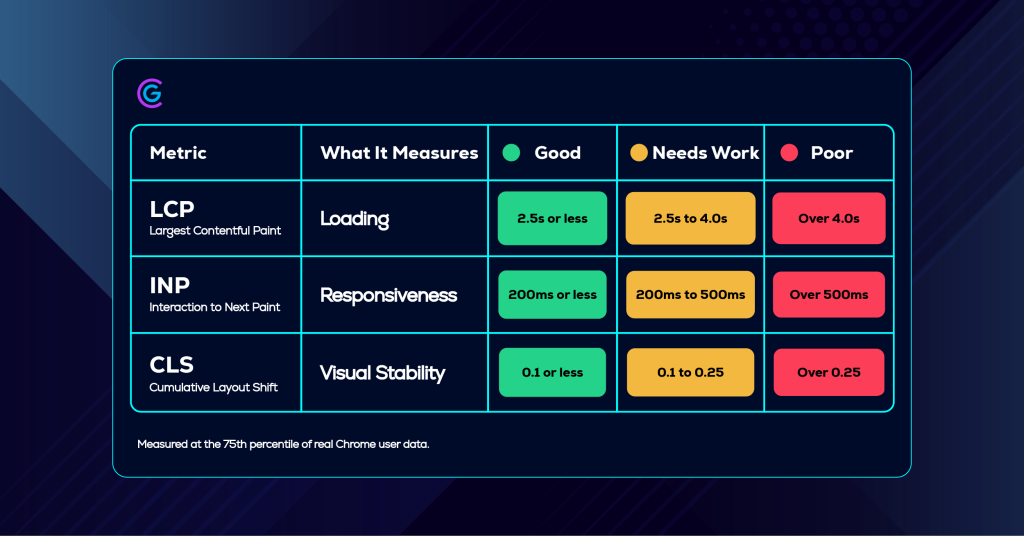
All three must hit the good threshold for the page to pass. A strong LCP does not offset a failing INP. Thresholds and measurement methodology come from Google Search Central.
Why INP Replaced First Input Delay
Interaction to Next Paint became the official responsiveness metric on March 12, 2024, replacing First Input Delay. The change matters more than a metric swap usually would. FID measured only the delay before the browser began processing the very first interaction on a page. INP measures the full latency of interactions across the page lifecycle and reports close to the worst one.
The consequence was immediate. Sites that had been comfortably green on FID turned yellow or red overnight. INP is now the most commonly failed of the three, because it is an architecture problem rather than a compression problem.
If a guide you are reading still lists FID as a Core Web Vital, it predates the change and its advice is out of date.
Field Data Versus Lab Data
Google grades these metrics on field data from the Chrome User Experience Report, at the 75th percentile, over a rolling 28-day window. At least 75 percent of real page views have to hit the good threshold before the page passes.
This is where most marketing teams misread their own reports. The large colored number at the top of PageSpeed Insights is a weighted lab estimate produced by a simulated device on a simulated connection. It is a diagnostic tool for finding the culprit. It is not the grade.
It also means patience is structural. Because the data reports on a 28-day rolling window, you will wait several weeks after shipping a fix before the numbers can tell you whether it worked.
Do AI Crawlers Measure Core Web Vitals?
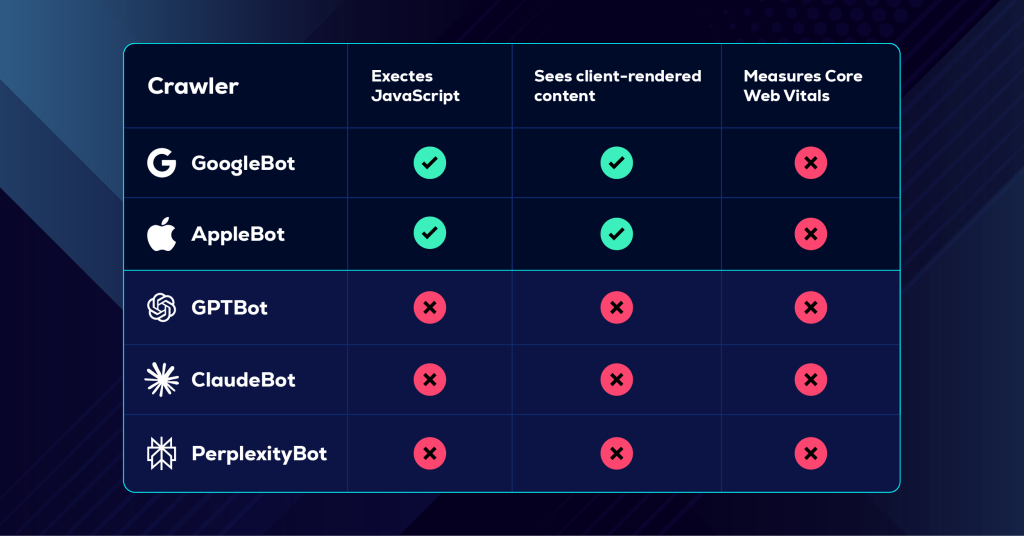
No. GPTBot, ClaudeBot, and PerplexityBot fetch the raw HTML your server returns, extract what is there, and move on. They do not execute JavaScript and they do not run a rendering engine. The metrics are collected from real Chrome users through the Chrome User Experience Report, which means a crawler contributes no field data and observes no performance at all.
What the Crawler Evidence Shows
The most widely cited dataset on this question comes from Vercel and MERJ, published in December 2024, based on real crawler traffic across the Vercel network. Their analysis found that none of the major AI crawlers render JavaScript. GPTBot downloaded JavaScript files in roughly 11.5 percent of its requests and never executed them. ClaudeBot downloaded them in roughly 23.8 percent of requests, with the same result.
The scale is not marginal. In the study month, GPTBot generated 569 million requests across the Vercel network and ClaudeBot generated 370 million, against 4.5 billion for Googlebot. As of publication, no major AI vendor has publicly documented adding JavaScript rendering to its crawler.
What AI Crawlers Do Care About
Three things, and none of them are Core Web Vitals.
First, whether your main content exists in the raw HTML response before any script runs. This is binary. A client-rendered page serves these crawlers an empty container and nothing else. There is no partial credit and no second pass.
Second, whether your server responds quickly and reliably enough for the fetch to complete. Server response time matters to a crawler even though the rendered-experience metrics do not.
Third, whether your JSON-LD sits in that same raw source rather than being injected client-side. This is a common failure mode for teams who added structured data for AI search through a tag manager and assumed it was working.
The Two Exceptions
Two crawlers in the AI-relevant set do render JavaScript, and both do it because they inherited infrastructure built for search long before generative AI existed. Google Gemini rides Googlebot rendering, and Applebot runs a browser-based crawler.
That is the exception rather than the rule. Relying on Googlebot rendering to cover AI visibility was a defensible position a few years ago. It now covers one lane of a widening road.
“Your Lighthouse score describes an experience no AI crawler will ever have. GPTBot does not wait for your JavaScript, does not render your page, and does not measure how it felt.”
Why Core Web Vitals Still Matter for AI Search Visibility
Core Web Vitals reach AI search through three indirect pathways: AI Overviews draw from Google’s index, where page experience is one ranking input among many; Google explicitly names page experience in its own guidance for succeeding in AI search; and AI referral traffic is scarcer and higher intent, which makes each landing experience worth more rather than less.
Pathway 1: AI Overviews Draw From Google’s Index
AI Overviews and AI Mode are built on Google Search infrastructure. They draw candidates from the same index, shaped by the same ranking systems, which means page experience signals reach AI citations through the ranking layer rather than directly.
Be honest about the weight. Relevance and authority do the heavy lifting. They function as a tiebreaker between pages that are otherwise closely matched. That is a real advantage in a competitive space and a poor use of budget in an uncompetitive one.
Pathway 2: Google Names Page Experience in Its Own AI Guidance
In its May 2025 guidance on succeeding in AI search experiences, Google lists providing a great page experience alongside unique non-commodity content and technical accessibility. The guidance names latency, how well a page displays across devices, and whether visitors can easily distinguish main content from everything else.
That is first-party evidence from the company operating the largest AI search surface. It is worth more than any correlation study, and it is the reason performance work stays inside an AI visibility program rather than getting cut from it.
Pathway 3: AI Referrals Are Scarcer and Cost More to Earn
Traffic arriving from an AI citation behaves differently from classic organic traffic. It is lower in volume and higher in intent, because the visitor has already read a summary and chose to click anyway.
Each of those visits costs more to earn. A citation that delivers a qualified buyer to a page that shifts under their thumb as they reach for the button is a wasted citation. The scarcer the click, the more the landing experience matters.
The Overlap: Same Fixes, Two Scorecards
Here is the reconciliation, and it is why this work stays funded. Server-side rendering, a smaller JavaScript payload, fewer third-party scripts, and stable HTML structure improve every Core Web Vital and simultaneously make the page readable to crawlers that never run scripts.
“Core Web Vitals and AI readability are measured by different systems and fixed by the same engineering. The scorecards diverge. The work does not.”
How Do You Fix Each Core Web Vital?
Fix whichever metric sits in the poor band first. After that, work INP, then LCP, then CLS. INP is the hardest and most commonly failed, LCP carries the highest commercial impact, and CLS is usually the fastest to resolve. Do not spend engineering hours optimizing a metric that is already green.
Fixing LCP
Server response time sets the ceiling. If your time to first byte is slow, nothing downstream compensates, and no amount of image work rescues a page that took most of a second to start.
From there: compress and serve the hero image in a modern format, preload the LCP element so the browser stops discovering it late, and remove render-blocking CSS and JavaScript above the fold.
Asset compression is not optional housekeeping. Every image we publish is compressed before upload, because an oversized hero image is the most common single cause of a failing LCP on an otherwise healthy page.
Fixing INP
This is the hard one, and it helps to say why. LCP problems are usually about resources. CLS problems are usually about missing dimensions. INP problems are about JavaScript architecture, which means you cannot compress or attribute your way out of them.
Any task that occupies the main thread for more than roughly 50 milliseconds blocks the browser from responding to input. Stacked long tasks are why a button feels dead for half a second after a click.
Break up long tasks, defer non-critical scripts, and audit what your tag manager is actually loading. On marketing sites specifically, third-party scripts are the usual culprit and the least examined.
Fixing CLS
Set explicit width and height on every image and embed so the browser reserves the space before the asset arrives. Reserve space for ad slots, cookie banners, and late-loading widgets rather than letting them shove content down the page. Handle web font loading so a font swap does not reflow the layout underneath the reader.
CLS is usually the cheapest of the three to fix and the most obvious to a human being when it is broken.
The Two-Lane Performance Audit
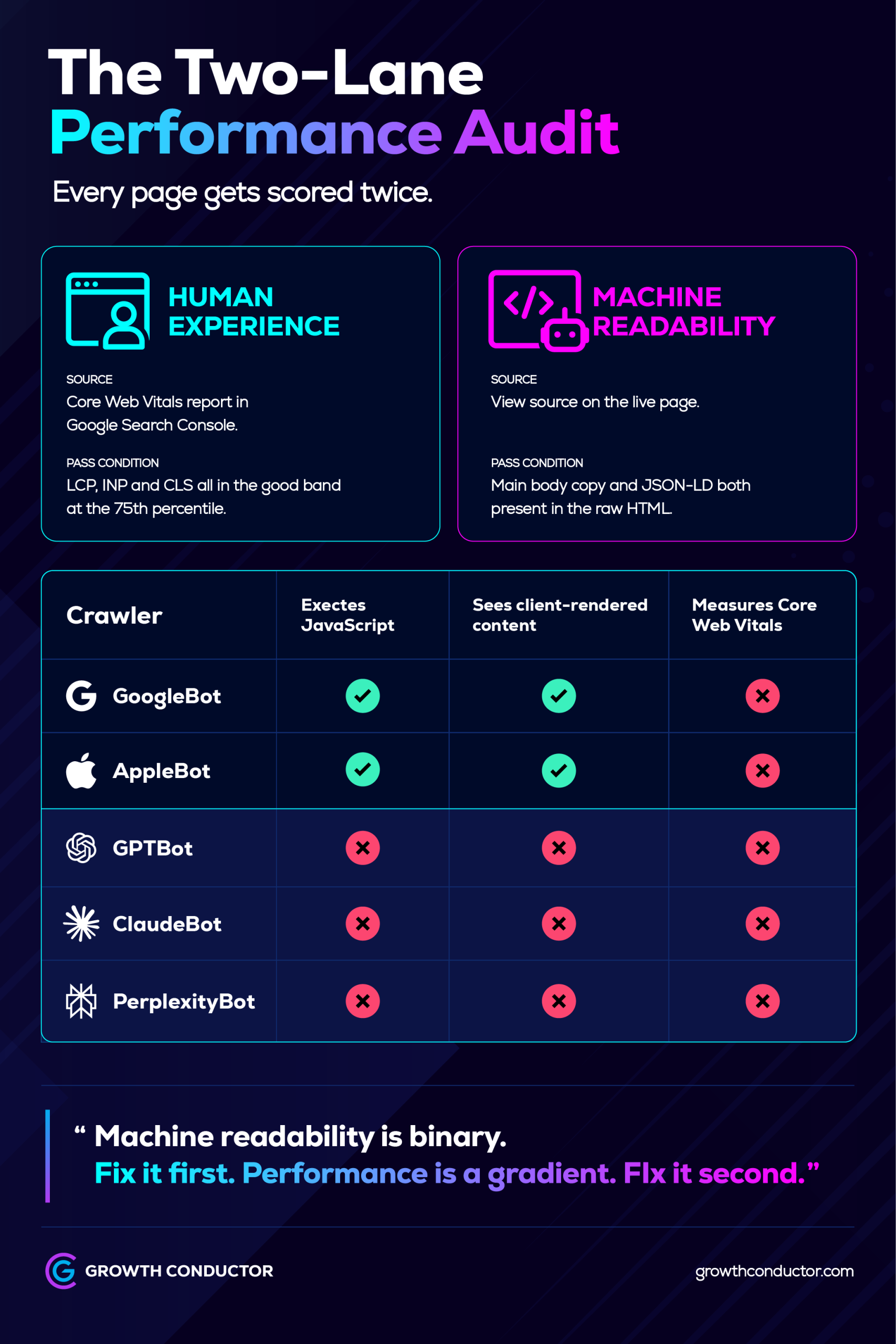
The Two-Lane Performance Audit scores a page on two independent dimensions: human experience, measured through real-user field data, and machine readability, measured by inspecting the raw HTML an AI crawler receives. A page can pass one lane and fail the other completely. Most audits check only the first and report a verdict the data does not support.
That is how a site ends up with a green Search Console report and no presence in three of the four systems now shaping discovery. This is the framework we run instead.
Lane 1: The Human Experience Check
Pull field data from the Core Web Vitals report in Google Search Console, which reflects real visitors rather than a simulation. Use PageSpeed Insights to diagnose which element or script is responsible, not to grade the page.
Record the 75th percentile value for each metric per template, not per URL. Templates are the unit of work. Fixing the worst-performing template multiplies across every page built on it, which returns more than chasing individual URLs ever will.
Pair this with the reporting you already run, so performance data sits beside visibility data. If you track AI Overview performance in Search Console, the two datasets belong in the same monthly review.
Lane 2: The Machine Readability Check
This takes two minutes and requires no tooling.
Open the page and view source. That is what an AI crawler receives. Do not use the DevTools Elements panel, which shows the rendered DOM after JavaScript has run and will tell you everything is fine when it is not.
Search that raw source for a full sentence of your main body copy. If the sentence is not there, the crawler never saw it. Then confirm your JSON-LD block sits in the same raw source and that its claims match what a reader actually sees on the page.
Repeat for the templates carrying your money content: service pages, pillar pages, and cornerstone articles.
Reading the Two Lanes Together
Four outcomes, four different next actions.
- Pass and pass: maintain, and move budget to content quality, which is what actually earns citations.
- Pass and fail: the dangerous quadrant. The page feels fast, ranks acceptably, and is invisible to every AI system that is not Google. Fix rendering before anything else.
- Fail and pass: readable but slow. A tiebreaker problem in classic search and a conversion problem after the click.
- Fail and fail: rebuild the template rather than optimizing around it.
The sequencing rule holds across all four. Machine readability is binary, so it gets fixed first. Core Web Vitals are a gradient, so they get fixed second. No tool score will tell you that, because a tool ranks problems by severity and a strategist ranks them by consequence.
Where Core Web Vitals Fit in Your Website Optimization Strategy
Core Web Vitals are a floor, not a differentiator. Passing them makes you eligible. It does not make you citable. Non-commodity content and machine readability do that work, and no amount of performance tuning substitutes for either.
For a team with limited engineering hours, the order that produces the most visibility per hour is straightforward. Confirm your content reaches crawlers in raw HTML. Get your structured data into that same source. Then work the performance gradient. Then keep investing in content depth, which is the only one of the four with no ceiling. Each of these is a piece of a broader approach to website optimization for AI search.
This is where infrastructure and judgment split cleanly. Proprietary AI infrastructure can surface every failing metric across every template on a site in minutes. Deciding which of those failures is actually costing you revenue this quarter is a human call, informed by what the business is trying to sell and to whom.
Frequently Asked Questions
Indirectly. No AI crawler measures Core Web Vitals, so they are not a direct input to AI citation decisions. They do influence Google ranking systems, and AI Overviews draw candidates from that index, so weak page experience can reduce the odds of appearing in the pool an AI Overview selects from.
No. The Vercel and MERJ analysis of real crawler traffic, published in December 2024, found that GPTBot, ClaudeBot, and PerplexityBot fetch raw HTML without executing JavaScript. Google Gemini and Applebot are the exceptions, because both ride rendering infrastructure built for search. As of publication, no AI vendor has documented adding rendering to its crawler.
LCP at 2.5 seconds or less, INP at 200 milliseconds or less, and CLS at 0.1 or less. All three must hit the good threshold for the page to pass. Google measures at the 75th percentile of real Chrome user data over a rolling 28-day window, so lab scores do not count.
No. INP replaced FID as an official Core Web Vital on March 12, 2024. FID measured only the delay before the browser began processing the first interaction on a page. INP measures the latency of interactions throughout the page lifecycle and reports close to the worst one, which makes it substantially harder to pass.
Open the page and view source, then search that raw HTML for a full sentence of your main body copy. If it is not there, the crawler never saw it. Use view source rather than the DevTools Elements panel, which displays the rendered DOM after JavaScript has run and will mislead you.
Key Takeaways
- The three Core Web Vitals are LCP, INP, and CLS, at 2.5 seconds, 200 milliseconds, and 0.1, measured at the 75th percentile of real Chrome user data.
- AI crawlers do not execute JavaScript and cannot measure Core Web Vitals. Advice that assumes otherwise is wrong at the mechanism level.
- They still shape AI visibility through Google’s index, through Google’s own stated page experience guidance, and through the value of each scarce AI referral after the click.
- The remediation overlaps almost entirely. Server-side rendering and a lighter JavaScript payload serve both scorecards at once.
- Run both lanes. Fix machine readability first because it is binary, then work the performance gradient.
Find Out Which Lane Your Site Is Failing
If you do not know which of your templates fail Lane 2, that is the audit to run before anything else on your roadmap. It takes minutes to check, and it is the difference between a site that ranks and a site that gets cited.
Our team runs the Two-Lane Performance Audit as part of ongoing technical SEO support, template by template, with the sequencing decisions made against your commercial priorities rather than against a severity score.