


Most sites that fail in AI search fail before a single word gets read.
That is a difficult thing to accept when you have invested in content. You hired writers who understand the subject. You covered the topic properly. Then you watched competitors with thinner, later, less careful pages get pulled into AI Overviews while your work sat untouched. The natural conclusion is that something is wrong with the writing, so you rewrite, restructure, and add depth. Nothing changes.
Nothing changes because the problem is not in the writing. It is underneath it.
Google’s generative AI features do not run on a separate system with separate rules. They are grounded in the same Search index that produces ordinary results. When someone asks AI Mode a question, the model does not consult a private AI database built for the occasion. It queries the Search index, retrieves pages that are already indexed and already eligible to be shown, reads what those pages say, and builds an answer with links back to the sources it used.
That single fact reorganizes the whole problem. Retrieval is a gate, and the gate is technical. If your page is not crawlable, not indexed, or not eligible to be shown with a snippet, it is not a candidate. Content quality gets evaluated among candidates. A page that never becomes a candidate is not competing badly. It is not competing at all.
Technical SEO for AI search is not a maintenance checklist that AI made obsolete. It is the eligibility layer, and it is where most AI visibility problems actually live. What follows is what technical SEO for AI search actually consists of, how each part fails, and how to test your own site against it.
Does Technical SEO Still Matter for AI Search?
Yes. Google states that SEO best practices remain relevant for its generative AI features because those features are rooted in the core Search ranking and quality systems. AI Overviews and AI Mode retrieve from the same index as ordinary results, which means the technical work that earns indexing is the same work that earns retrieval.
The question comes up constantly, and the confusion behind it is reasonable. An AI Overview looks nothing like ten blue links. It reads like something a system produced from its own knowledge rather than something assembled out of web pages. If the output is that different, surely the input requirements are different too.
They are not. Google has been unusually direct about this in its guide to optimizing for generative AI features on Google Search, going as far as to say that from its perspective, optimizing for generative AI search is optimizing for the search experience, and is therefore still SEO. The industry terms that grew up around this shift, answer engine optimization and generative engine optimization, describe a focus area rather than a separate discipline with separate mechanics.
The distinction matters practically, not just semantically. If AI search ran on a different system, you would need a different playbook, different tooling, and a different measurement model, and every hour spent on traditional SEO would be an hour not spent on the new thing. Because it is the same system with a different presentation layer, the work compounds instead of competing. A page you make properly crawlable and indexable becomes eligible for blue links and AI citation in the same motion.
There Is No Separate AI Index
The mechanism Google uses is retrieval-augmented generation, which Google also calls grounding. It is worth understanding in some detail, because the details are where the practical implications live.
When a user asks a question, the model does not answer from what it absorbed during training. Training data is frozen at a point in time and would go stale immediately for anything current. Instead, the question runs through Google’s core Search ranking systems, which retrieve relevant and up-to-date pages from the Search index. The model then reviews the specific information on those retrieved pages and generates a response grounded in what it found, displaying prominent clickable links to the pages that support the answer.
Every step in that chain depends entirely on the step before it. Retrieval depends on indexing. Reading depends on retrieval. Citation depends on reading. There is no branch of the process where a well-written page that never made it into the index gets pulled in on merit, because merit is only assessed on pages that were retrieved.
This is why diagnostic order matters so much. When a page is not being cited, the first question is not whether the content is strong enough. It is whether the page was ever eligible to be retrieved at all. Those are entirely different problems with entirely different fixes, and treating the second as though it were the first is the most common way teams lose six months.
What Query Fan-Out Means for Your Site Architecture
Google layers a second technique on top of retrieval called query fan-out. Rather than running only the question the user typed, the model generates a set of concurrent related queries to gather more context than the original phrasing contains.
Google’s own example is a user asking how to fix a lawn that is full of weeds. The fan-out queries might include best herbicides for lawns, removing weeds without chemicals, and preventing weeds in a lawn. The model gathers results across all of those at once and synthesizes an answer from the combined set.
For your site, this changes what good coverage looks like. Retrieval is not a single lookup against a single page hoping to match a single phrasing. It is several lookups across several angles simultaneously. A topic covered across a set of well-linked, individually indexable pages presents more distinct surfaces to that process than the same material compressed into one very long page.
There is an important limit, and Google states it plainly. Creating separate content for every possible variation of how people might search, specifically to manipulate rankings or AI responses, violates Google’s scaled content abuse policy. Google also notes it is ineffective as a long-term strategy, because a high quantity of pages does not make a website higher quality or more relevant to users.
The line to hold is between coverage and fragmentation. Coverage means each page answers a genuinely different question and stands on its own. Fragmentation means slicing one answer into eight thin pages to catch eight phrasings of the same intent. Google’s systems are good enough at understanding relevance without exact keyword matching that the second approach buys nothing and risks a policy problem. For the strategic version of this shift rather than the technical one, we covered what actually changed in search separately.
What Are the Requirements to Appear in AI Overviews?

To appear in Google’s generative AI features, a page must be indexed, it must be eligible to be shown in Google Search with a snippet, and the site must be included in Search generative AI features in Search Console. Meeting all three does not guarantee inclusion, because indexing and serving are never guaranteed. Missing any one of them rules it out entirely.
Google publishes these as requirements rather than best practices, and that distinction is worth sitting with. Best practices improve your odds. Requirements determine whether you have odds at all.
Most teams have never audited all three. The first is familiar enough that it usually gets checked. The second is obscure enough that experienced SEOs skip it. The third is a setting many people do not know exists. Here is how each one works, how it fails, and how to verify it.
Requirement 1: The Page Is Indexed
Indexing means Google has crawled the page, processed it, and stored it in the Search index as a candidate for retrieval. If that has not happened, nothing downstream can happen either.
To check a single page, run URL Inspection in Search Console and look for confirmation that the URL is on Google. For a site-level view, the Pages report sorts every URL Google knows about into indexed and not indexed, with a reason attached to each item in the not-indexed group. That reason column is usually where the diagnosis lives, and it is worth reading carefully rather than skimming the totals.
The causes are rarely exotic. A noindex directive left behind when a site moved from staging to production, applied site-wide and never removed. A robots.txt rule written to block one directory that also happens to match a path nobody anticipated. A page that exists in the sitemap but has no internal link pointing at it, which Google may discover and then deprioritize because nothing on the site treats it as worth linking to.
There is also a category Google reports as crawled but not indexed, and it confuses people because it looks like a technical failure when it usually is not. It means Google reached the page, evaluated it, and chose not to store it. That is a quality or duplication signal rather than an access problem, and the fix is editorial rather than technical. Adding more internal links to a page Google has already declined on quality grounds will not change the outcome.
One more thing worth internalizing. Google states that meeting every requirement and following every best practice still does not mean it will crawl, index, or serve a page. Indexing and serving are not guaranteed. Requirements remove the reasons for exclusion. They do not compel inclusion.
Requirement 2: The Page Is Snippet-Eligible
This is the requirement that gets missed most often, and it fails more silently than any other item in this article.
A page must be eligible to be shown in Google Search with a snippet in order to be eligible for generative AI features, a condition Google spells out in its documentation on AI features and your website. That eligibility is controlled by preview directives you can set at the page, element, or server level. The nosnippet robots meta tag suppresses text snippets for the page entirely. The max-snippet directive caps how many characters Google may display, and set to zero it behaves the same way nosnippet does. The data-nosnippet HTML attribute does the same job at the element level, excluding specific sections of a page from snippet use.
Each of these has legitimate applications. Publishers use them to protect paywalled material. Some organizations apply them to keep specific language out of search results for compliance or legal reasons. The risk is that a directive applied site-wide to solve a narrow problem in a single template gets inherited by every page published afterward, long after the original reason stopped applying. Nothing in the ordinary reporting surface will resurface that decision for review.
The failure mode is brutal precisely because everything else looks healthy. The page indexes normally. It appears in Search Console with no errors. It may rank perfectly well in ordinary results. It simply cannot be quoted, which means it cannot be used to ground an AI answer, and no report anywhere will tell you that is why.
To check, view the page source and search for nosnippet, max-snippet, and data-nosnippet. Then check the HTTP response headers, because the X-Robots-Tag header can carry the same directives at the server level where no amount of reading the HTML will ever reveal them. That second step is the one people skip, and it is the one that catches the worst version of this problem.
Requirement 3: The Site Is Included in Search Generative AI Features
The third requirement is a site-level setting rather than a page-level property. Google requires that a site be included in Search generative AI features in Search Console in order to be eligible for display in those features.
This one is binary and fast to verify. Either the site qualifies or the other two requirements are academic. It also sits outside the normal workflow of most content and SEO teams, which is exactly why it can go unexamined for years. Nobody audits a setting they do not know exists, and nothing in the ordinary reporting surface will prompt them to.
Add it to your onboarding checklist for every property you manage. It costs a minute, and it is the kind of thing that explains an otherwise inexplicable absence from AI results on a site where everything else looks correct.
The 60-Second Eligibility Check
1. Run URL Inspection in Search Console. Is the page on Google?
2. View source and check response headers for nosnippet, max-snippet, data-nosnippet, or X-Robots-Tag.
3. Open Search Console settings. Is the site included in Search generative AI features?
Run this on your five most important pages before you touch a word of the content. Three no answers is three reasons your work will never be cited, and none of them are fixable by writing.
How Crawlability Decides What AI Can Cite
Google’s generative AI features rely on publicly accessible, crawlable content. A page a crawler cannot reach is invisible to retrieval regardless of quality. Crawlability is a precondition rather than a ranking factor, and it fails silently, which is exactly what makes it dangerous to leave unexamined.
Eligibility answers whether a page is permitted to be used. Crawlability answers whether Google can get to it in the first place, how much of your site it can process, and how often it comes back to see what changed. This is the part of technical SEO for AI search that most content teams never touch, because it lives in infrastructure rather than in the CMS.
The Three Ways a Crawler Finds a Page
Google discovers content three ways: by following internal links from pages it already knows about, by reading your XML sitemap, and by following external links from other sites. Most pages are found through more than one of these. Some are found through only one, and that is where problems concentrate.
Internal links do more than route discovery. They communicate structure and relative importance. A page linked from your main navigation and referenced by six related articles reads as central to what the site is about. A page that appears only in the sitemap reads as an afterthought, because nothing else on the site treats it as worth pointing to. Google may crawl it and still decide it does not merit a place in the index.
On content-heavy sites this failure is usually accidental, and it follows a predictable shape. Articles get published, added to the sitemap automatically by the CMS, and then never linked from anywhere else. The blog archive lists them for a few weeks until pagination pushes them onto page four. After that the page is functionally orphaned. It exists, it is technically discoverable, and it carries no signal that anyone should care about it.
For AI search this compounds. Query fan-out rewards sites where related content is genuinely connected, because those connections help establish that a page belongs to a subject the site covers seriously rather than a one-off someone published and forgot. A disconnected page is a page with no context, and context is a large part of what retrieval is assessing.
The fix is unglamorous and effective. Every article should be linked from at least two other places on the site, and the anchor text should describe what the destination covers rather than saying click here or read more. This is a fifteen minute task per article that most content workflows simply do not include.
Crawl Budget, and When It Actually Matters
Crawl budget gets discussed far out of proportion to how often it is anyone’s real problem. Google’s guidance points site owners toward crawl budget optimization specifically for very large and frequently updated sites, which is a narrower group than the volume of commentary suggests.
The mechanics are straightforward enough. Google allocates a finite amount of crawling to each site, shaped by how much load the site can handle and how much Google wants to crawl it. Spend that allocation on URLs that do not matter and the URLs that do matter get crawled less often, which means updates take longer to register and new pages take longer to appear.
Whether this is your bottleneck depends almost entirely on scale and URL hygiene. A two hundred page business site with a clean structure will never exhaust its allocation, and time spent optimizing crawl budget there is time stolen from work that would actually move something. An ecommerce catalog where faceted navigation generates tens of thousands of filter and sort combinations, each one a distinct crawlable URL, absolutely will exhaust it. So will a large publisher with deep archives and aggressive pagination.
If you are in the first group, skip this and go back to eligibility and internal linking. If you are in the second, the fix usually is not asking Google to crawl faster. It is reducing how many worthless URLs exist to be crawled in the first place, by controlling which parameter combinations are reachable at all.
Duplicate Content Splits the Signal
Google recommends reducing duplicate content for two stated reasons: it makes for a poor user experience, and search engines may waste crawling resources on URLs you do not even care about.
The version that affects most sites has nothing to do with plagiarism or scraping. It is accidental multiplication. The same page reachable with and without a trailing slash. With and without www. Over HTTP and over HTTPS. With UTM parameters appended by every campaign that ever linked to it. Filed under two category paths because someone wanted it visible in both. Duplicated at a print-friendly URL that nobody remembered to noindex.
Each variant is a separate URL from a crawler’s perspective, even though a human sees one page. Google will usually pick one version as canonical on its own, but that leaves the decision to an inference, and every crawl spent evaluating near-identical copies is a crawl not spent on something that matters.
Canonical tags resolve this by declaring which version is authoritative. Consistent internal linking reinforces it, because linking to three different variants of the same page actively undermines the canonical signal you just set. Server-level redirects handle the protocol and subdomain variants permanently, which is better than declaring a preference and hoping.
None of this is technically difficult. It is simply invisible until someone runs a crawl and discovers four thousand URLs on a site with six hundred actual pages.
Why JavaScript Rendering Quietly Breaks AI Visibility
Google can process content inside JavaScript as long as it is not blocked, but JavaScript introduces a rendering step where content can go missing. If your main content only exists after client-side rendering, and that rendering fails or stalls, the version Google indexes can be close to empty even though the page looks perfect in your browser.
Google states plainly that working on SEO for a site built with JavaScript frameworks is generally more complex than working on other kinds of sites. That is worth reading as the warning it is. More complex means more stages, and every additional stage is somewhere content can be lost without anyone noticing.
The Gap Between What You See and What Gets Indexed
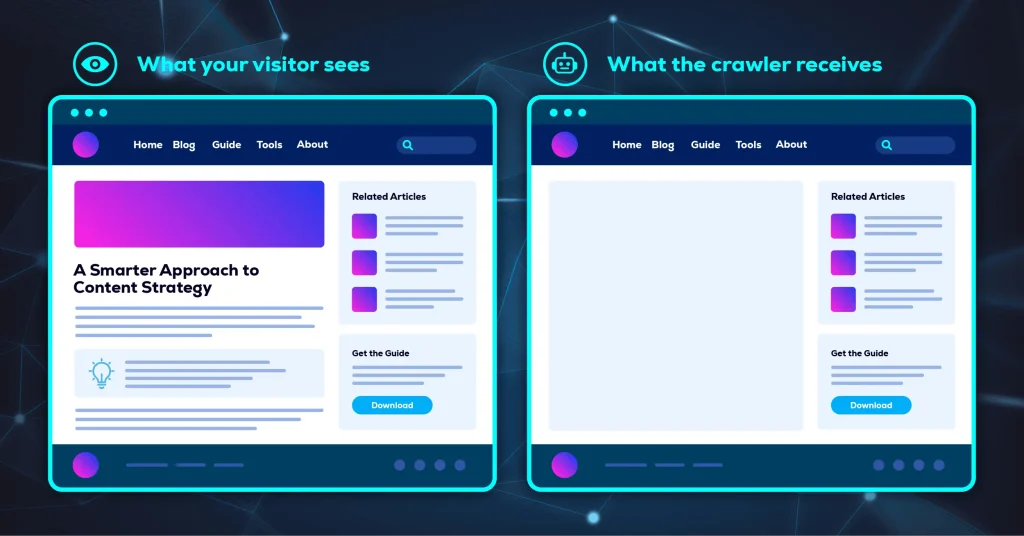
When a crawler requests your page, the first thing it receives is the raw HTML the server sends back. On a heavily client-rendered site, that raw HTML is often close to a shell: a header, a navigation bar, a footer, and an empty container where the content will eventually go. The article itself arrives afterward, when scripts execute in the browser and populate that container.
You never see this, because your browser runs the scripts instantly and shows you the finished page. The gap only exists in the window between the server response and the completed render, and that window is precisely where a crawler operates.
Google does render JavaScript, so this is not automatically fatal. But rendering is a separate pass with its own resource constraints and its own failure modes. A script that depends on a third-party service that times out, a resource blocked in robots.txt, an API call that fails for a request without cookies, content that only loads on scroll or on click: any of these can produce a rendered page that is missing the part you care about most.
The compounding problem for AI search is that a page can pass every other check on this list. It is indexed. It is snippet-eligible. It is crawlable and linked. And the thing that got indexed is a navigation bar and a footer, which contains nothing worth retrieving and nothing worth citing.
How to Diagnose It in Ten Minutes
You do not need a developer or a specialist tool to find out whether this is happening to you. Search Console will tell you directly.
- Open URL Inspection in Search Console and enter the URL you want to check.
- Run the live test rather than reading the cached result, so you are seeing current behavior.
- Open the rendered HTML view, which shows the page as Google assembled it after running scripts.
- Search that HTML for a distinctive sentence from the middle of your article, not the headline or the intro.
If the sentence is there, rendering is working and you can rule this out. If it is missing, Google is not seeing your content, which means no AI system retrieving from Google’s index is seeing it either. Check the page resources and JavaScript console output in the same panel, because the reason is usually a blocked or failed resource listed right there.
Run this on a template rather than a single page. If one article page fails this test, every article page built on that template is likely failing it too, which turns a page-level curiosity into a site-level explanation.
Does Site Speed and Page Experience Affect AI Search?
Google lists a good page experience among its technical recommendations for generative AI search, specifically naming displaying well across all devices, reducing latency, and making it easy for people to distinguish main content from other elements on the page. Treat page experience as a supporting signal rather than the thing that decides whether you get cited.
This section comes with a proportionality warning. Page experience is real and worth attention, and it is also the area where technical SEO effort is most reliably over-invested, because the tooling produces satisfying scores and the work feels productive. A page that loads in one second but is not snippet-eligible will never be cited. Fix the gate before you polish the approach to it.
Core Web Vitals, Translated
Three metrics carry most of the weight, and each is easier to act on once you translate it out of the acronym.
Largest Contentful Paint measures how long the largest visible element takes to appear, which in practice usually means your hero image or your opening block of text. When it is slow, the cause is normally an oversized uncompressed image, a slow server response, or render-blocking resources loading before the content does.
Interaction to Next Paint measures how quickly the page visibly responds when someone taps or clicks. When it is slow, the cause is usually JavaScript occupying the main thread long enough that the browser cannot repaint, which is why heavily scripted pages feel sticky even after they look finished.
Cumulative Layout Shift measures how much the page moves while loading. The usual culprits are images and ad slots without reserved dimensions, and web fonts that swap in and reflow the text underneath them.
Read all three as one question: does this page feel finished and stable by the time someone starts reading? That framing is more useful than the individual thresholds, because it points you at the specific thing a real visitor would notice.
Main Content Clarity Is the Underrated One
The item on Google’s list that receives the least attention is making it easy for people to distinguish your main content from the other elements on the page. It is worth more than it appears.
Full-screen interstitials, aggressive cookie walls, sticky headers and floating chat widgets consuming a third of a mobile viewport, and ad-dense templates that interleave promotional units with paragraphs all blur the boundary between your article and the furniture around it. A reader can usually work out which part is the article. A system parsing the page has to infer it from structure, and every ambiguous element makes that inference less certain.
Hold onto this one. It returns in a different and more literal form when we get to AI agents, where the ability to distinguish content from decoration stops being a nicety and becomes the whole problem.
Is Structured Data Required for AI Search?
No. Google states that structured data is not required for generative AI search and that there is no special schema.org markup you need to add in order to appear. Google also recommends continuing to use it as part of your overall SEO strategy, because it supports eligibility for rich results in Google Search.
Both halves of that matter, and the conversation around AI search almost always drops one of them.
Schema is not the secret key to AI Overviews. Any tool or agency positioning it that way is overstating what Google has said, and the overstatement is easy to spot once you know the actual language. Google names over-focusing on structured data explicitly as something site owners can stop worrying about for AI search purposes.
At the same time, structured data still earns rich results in ordinary search, still costs very little to implement once, and still helps systems parse what a page is about with less guesswork. Implement it because it does a real and separate job. Do not implement it expecting it to solve an AI visibility problem that is actually a crawlability problem, because it will not, and the disappointment will cost you the time you should have spent on the eligibility check. We went deeper on the mechanics in how structured data improves AI search clarity.
What You Can Safely Ignore
Several widely promoted AI search tactics have no effect in Google Search, and Google has named them directly rather than leaving the industry to guess. Knowing what to skip is worth as much as knowing what to do, because every hour spent on a tactic that does nothing is an hour not spent on eligibility, crawlability, or rendering.
What follows is drawn from Google’s own published guidance, and it contradicts a substantial amount of advice currently being sold. Note the scope carefully: this is what Google Search does and does not use. Other AI systems are separate products with separate behavior, and guidance about one is not automatically guidance about the others.
Chunking Content Into Small Pieces
There is no requirement to break your content into tiny fragments so that AI can understand it. Google states that its systems are able to understand the nuance of multiple topics on a page and show the relevant piece to users, and that there is no ideal page length.
Shorter or longer pages can each work well depending on your audience and subject matter, which is a judgment about readers rather than a technical specification. If your content is being restructured into artificially short blocks to satisfy a theory about how retrieval works, you are making the page worse for humans to solve a problem that does not exist.
Treating Structured Data as the Deciding Factor
Covered in its own section above, and worth restating here because it is the most persistent version of this pattern. Google names over-focusing on structured data as something you can stop worrying about specifically for generative AI search, because structured data is not required and no special markup exists that unlocks inclusion.
The trap is not implementing schema. The trap is implementing schema instead of fixing eligibility, then concluding that AI search does not work for your industry when nothing changes. Schema is worth doing on its own merits, and it is not a substitute for being retrievable.
Chasing Mentions Across the Web
Google’s generative AI features can surface what is being said about products and services across blogs, videos, and forum discussions, which has led to a market in manufacturing those mentions. Google notes that seeking inauthentic mentions is not as helpful as it might seem.
The reason is structural. Google’s core ranking systems focus on high-quality content while separate systems work to block spam, and the generative AI features depend on both. A mention strategy built on inauthentic placement is running directly at the systems designed to catch exactly that.
The Next Layer: Preparing Your Site for AI Agents
AI agents are autonomous systems that perform tasks on behalf of people, such as booking a reservation or comparing product specifications. Browser agents do not look at your site the way a person does. They work from screenshots, the DOM, and the accessibility tree. Sites built purely for human eyes frequently break for them.
Google frames this as something to explore if it is relevant to your business and you have extra time, and that framing is honest. This is not an emergency and it should not displace anything earlier in this article. It is worth understanding now because the work overlaps almost entirely with things you should already be doing, which makes it unusually cheap to get right.
The Three Ways an Agent Reads Your Site
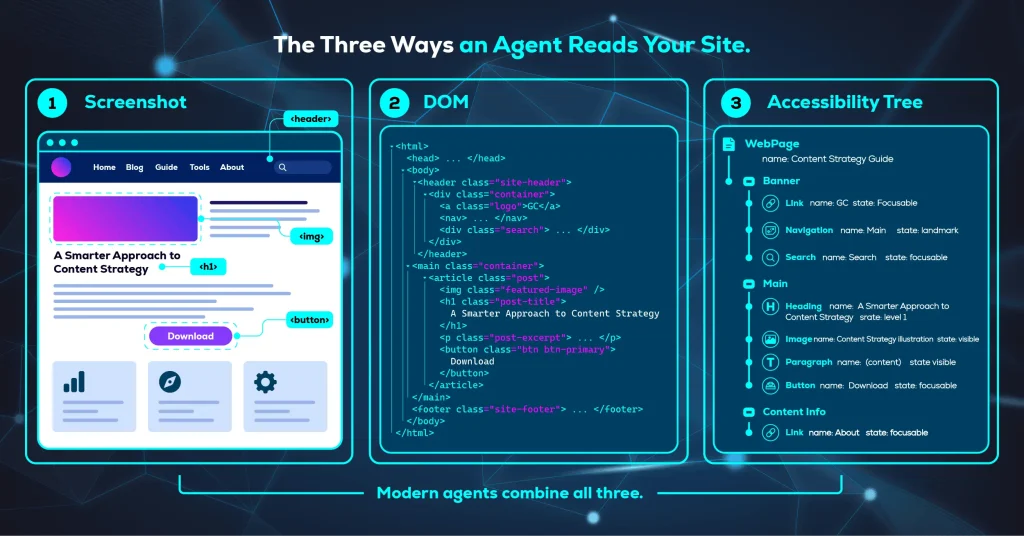
An agent never sees your site rendered on a monitor. It operates on a machine-readable representation, and the quality of that representation determines whether it can accomplish anything. There are three such representations, and modern agents use them together.
The first is screenshots. The agent captures the rendered page and uses a vision model to identify what it is looking at, using color, size, and proximity to infer importance. A large prominent button is treated with more caution than a small text link. The limitation is cost: analyzing images is slow and expensive in tokens, so this tends to serve as a fallback when the underlying structure is confusing rather than a primary method.
The second is the DOM. The agent reads your HTML directly and interprets how elements nest, what attributes define structure, and which pieces of data belong together. This is how it understands relationships. A Buy Now button inside a product container is assumed to belong to that specific product, and that assumption only holds if your markup actually reflects the relationship.
The third is the accessibility tree, a browser-native representation that distills the DOM down to the roles, names, and states of interactive elements. It was built for assistive technology, and it turns out to be close to ideal for agents, because it strips away visual noise and leaves a clean map of what the page can actually do.
Relying on any one of these creates a gap. An agent reading only the DOM might see a div without knowing you configured it as a functional button with CSS and JavaScript. An agent reading only screenshots might see where that button sits without knowing what it does. Combining them is how agents close the gap, and providing clean signals across all three is how you help.
What Actually Makes a Site Agent-Friendly
The Chrome team’s guidance on building agent-friendly websites is concrete enough to act on this quarter, and most of it is correcting habits rather than building anything new.
Use semantic HTML for anything actionable. Real button and anchor elements are recognized as interactive; styled div and span elements are not. Where framework constraints make that impossible, provide the appropriate role and tabindex so the element announces what it is. Setting cursor to pointer in CSS is an additional signal of actionability.
Keep layouts stable across similar pages. An agent working from screenshots gets confused when the same action sits in a different position on every product category, because it has no way to know the two buttons are the same thing.
Avoid ghost elements and transparent overlays sitting on top of interactive targets. Visual analysis may discard a node it believes is covered, even when the covering element is transparent and invisible to a human.
Connect labels to their inputs with the for attribute, so an agent can tell what a field is asking for rather than guessing from placement. And keep interactive elements visually large enough to survive visual analysis, since very small targets can be filtered out entirely.
Read that list again and notice what it actually is. Every item is also an accessibility improvement. Semantic elements, stable layouts, honest overlays, and properly labeled inputs are what screen reader users have needed for twenty years. As the Chrome team puts it, everything that makes a site agent-ready also makes it better for humans. Agent readiness is not a new discipline bolted onto SEO. It is a recommitment to the structured, semantic, accessible fundamentals that a lot of sites quietly abandoned somewhere in the last decade of visual redesigns.
How to Audit Your Site’s AI Search Readiness
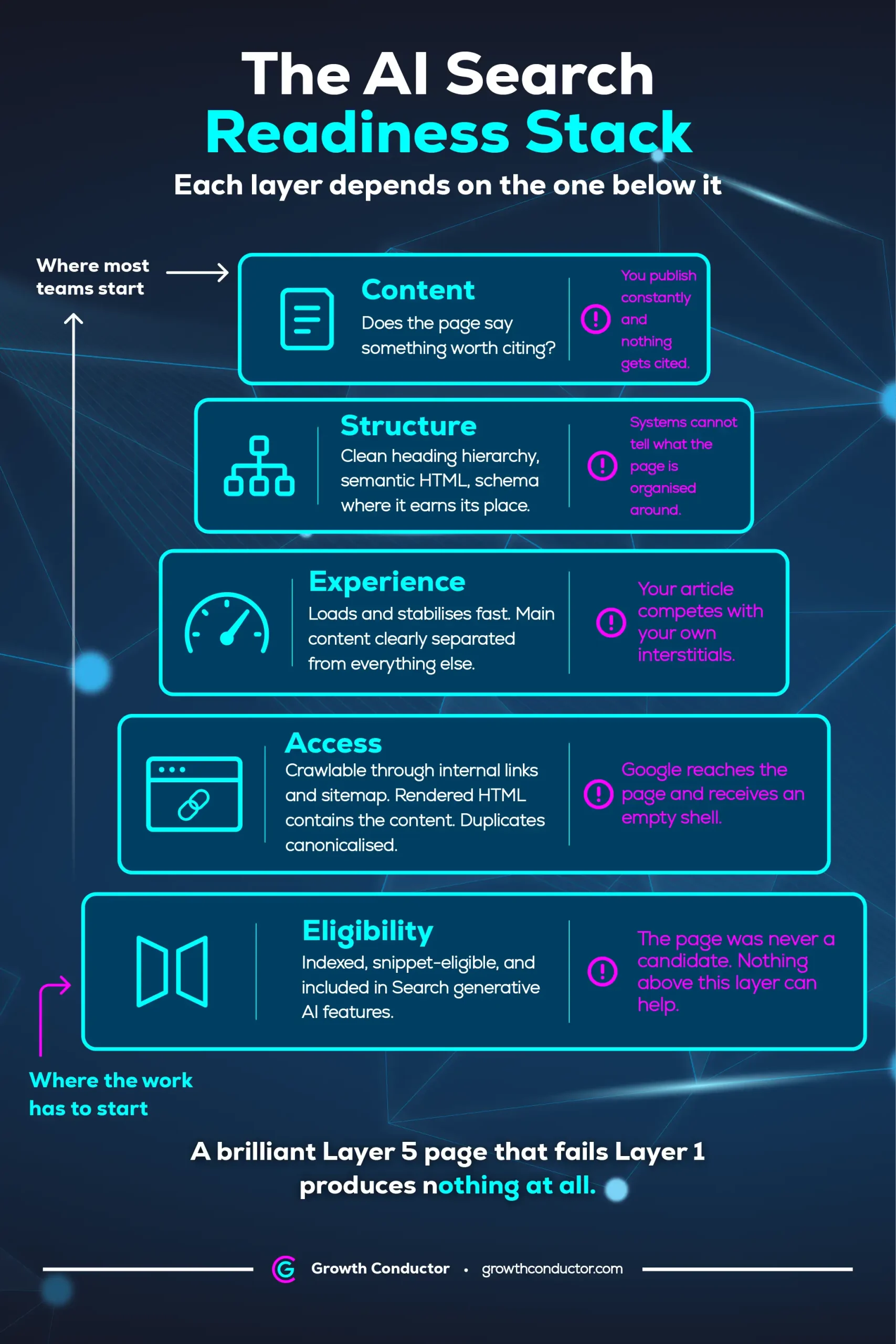
An AI search readiness audit works in a fixed order, because each layer depends on the one beneath it. Eligibility comes first, then access, then experience, then structure, then content. Most teams begin at the top of that list and cannot understand why the results never move.
The ordering is not a stylistic preference. It reflects the dependency chain in how retrieval actually works, and running the layers out of order produces technical SEO work that cannot pay off no matter how well it is executed.
Layer 1: Eligibility
Is the page indexed, is it snippet-eligible, and is the site included in Search generative AI features? This is the sixty second check from earlier in this article, and it is the only layer where a failure makes everything above it pointless. If a page fails here, stop and fix it before doing anything else. No amount of rewriting, restructuring, or schema will move a page that is not permitted to be retrieved.
Layer 2: Access
Can a crawler actually reach the page, and does what it reaches contain your content? This covers internal link paths, sitemap accuracy, robots.txt rules, canonicalization, and the rendering check. The specific question worth asking is not whether the page loads for you but whether the rendered HTML Google produces contains the substance of the article. A page can be perfectly eligible and still deliver nothing.
Layer 3: Experience
Does the page load and stabilize quickly on a mobile connection, and is the main content clearly separated from everything around it? This is where Core Web Vitals live, and it is also where the interstitials and overlays that obscure your content get caught. Worth doing, and worth doing after the two layers below it rather than instead of them.
Layer 4: Structure
Is the heading hierarchy logical and complete, is the HTML semantic, and is structured data present where it earns its place? This layer is about how legibly the page communicates its own organization, to search systems, to assistive technology, and increasingly to agents. It is also cheap to fix relative to how long it stays fixed.
Layer 5: Content
Does the page say something worth citing, or is it a restatement of what fifty other pages already say? This is the layer everyone starts with, and it is the only one that cannot be automated. It is also genuinely decisive once the four layers beneath it are sound, because among eligible candidates, distinctiveness is what determines which one gets pulled into an answer.
The logic of the order is what makes it useful. A brilliant Layer 5 page that fails Layer 1 produces nothing at all. A structurally unremarkable page that passes all five is a live candidate. This is why our technical SEO and content architecture work begins with infrastructure rather than with a content calendar, and why we score content against a defined threshold before it publishes rather than diagnosing it six months later.
The ordering is the finding
Almost every stalled AI visibility effort is Layer 5 work performed on a page that fails Layer 1. The content gets better every quarter. The page was never a candidate. Diagnose upward from eligibility and the wasted quarters stop.
The judgment call is which findings actually matter. Run an automated crawl on any site of reasonable size and it will return more issues than anyone can act on, most of them technically true and practically irrelevant. Deciding which handful will move retrieval for this business, on this stack, at this scale, is the part no tool does for you. Proprietary AI infrastructure can run the diagnostics and surface the patterns. Choosing what to fix first, and what to deliberately leave alone, is human judgment, and it is the difference between a report and a result.
Frequently Asked Questions
Yes. Google states that SEO best practices remain relevant because its generative AI features are rooted in the core Search ranking and quality systems. AI Overviews and AI Mode retrieve from the same Search index that powers ordinary results, so a page that is not indexed cannot be retrieved or cited regardless of how strong its content is.
Check three things. Run URL Inspection in Search Console to confirm the page is indexed. Check the page source and HTTP response headers for nosnippet, max-snippet, or data-nosnippet directives that would remove snippet eligibility. Then confirm in Search Console settings that the site is included in Search generative AI features. All three must pass.
No. Google states that structured data is not required for generative AI search and that no special schema.org markup is needed to appear. Google still recommends using it as part of an overall SEO strategy because it supports eligibility for rich results in Google Search. Implement it for that reason rather than as a fix for AI visibility.
The most common causes are technical rather than editorial. The page may not be indexed, it may carry a preview control such as nosnippet that removes snippet eligibility, or the site may not be included in Search generative AI features in Search Console. Check those three before rewriting anything, because content changes cannot fix an eligibility failure.
Not inherently. Google can process content inside JavaScript as long as it is not blocked, but JavaScript adds a rendering step where content can be lost. If your main content only exists after client-side rendering, the indexed version may be nearly empty. Use the URL Inspection live test to compare the rendered HTML against what visitors actually see.
Key Takeaways
- There is no separate AI index. Google’s generative AI features retrieve from the same Search index as ordinary results, so indexing is the precondition for citation rather than a parallel concern.
- Three requirements gate eligibility: the page must be indexed, it must be eligible to be shown with a snippet, and the site must be included in Search generative AI features in Search Console.
- Snippet eligibility is the most commonly missed requirement, and it fails invisibly. Check response headers as well as page source, because X-Robots-Tag will not appear in the HTML.
- Rendering failures produce pages that pass every other check and still contain nothing retrievable. Compare rendered HTML against what visitors see, at the template level rather than page by page.
- Content chunking and manufactured mentions do nothing for Google Search, and structured data is not the deciding factor for AI inclusion. Google has said so directly.
- Audit from the bottom layer up. Work at Layer 5 on a page that fails Layer 1 cannot produce a result no matter how good it is.
Where to Start
If your content is strong and your AI visibility is not, the problem usually sits one or two layers below the content. Run the sixty second eligibility check on your five most important pages before you commission another rewrite. Fifteen minutes will tell you whether you have a writing problem or an infrastructure problem, and those two problems have nothing in common except the symptom.
If the answer turns out to be infrastructure, that is the work we do. Our approach starts at Layer 1 rather than at the content calendar, because optimizing pages that are not eligible to be retrieved is the most expensive way to make no progress. Whether the fix lives in your technical SEO or in the build itself, our website services team starts with a technical readiness review to find out what is actually standing between your best pages and the AI systems that should be citing them.